Google Ads agency for online stores · Google ShoppingYour shop window, on the street of people searching.

People who reach Google are mostly searching, today, for what you sell. The question is whose shop window stops them: yours or your competitors’.

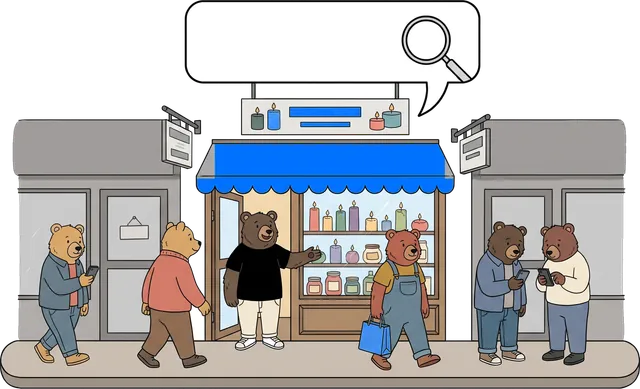
The street of shop windows: bears search on their phones, and Mircea welcomes them into your store, with the blue awning
New order · €40example
8.5bnGoogle searches a day
2.5bnmonthly YouTube users
8:1revenue for every $1 spent
01 · What it is

Promotion on Google Ads: Search and Performance Max

Google Ads are the ads that appear when someone searches Google for what you sell: in Search, in Shopping, on YouTube and in other partner places. On Search and Shopping you pay only when the person clicks; on YouTube and in the partner network, how you pay depends on the campaign type.

Mircea pointing at your store’s shop window
What do you sell? Choose, and the drawings on the page show your product.
CANDLESCLOTHESFURNITURECOSMETICSCOMPETITORscented candles?summer dress?upholstered armchair?vitamin C serum?scented candles?summer dress?upholstered armchair?vitamin C serum?

The street of shop windows

Mostly people who are searching for what you sell walk down this street. The question is whether your shop window stops them, or your competitor’s. Facebook helps people discover you; Google mostly captures what they are already searching for.

SearchShoppingYouTubePerformance Max
candlesSponsoredSponsoredcandlesSponsoredYouTubeAdSkipnews siteAdGmailPrimaryPromotionsSponsoredGoogleSponsoredIoana
Not only in search · blue = your ad
  1. 01Google SearchAt the top or bottom of the results, marked “Sponsored”, exactly when people search for what you sell.
  2. 02ShoppingThe photo, price and store name, straight in the results.
  3. 03YouTubeBefore or during videos, in Shorts and in YouTube searches.
  4. 04Partner networkBanners on millions of Google partner sites and apps: news, blogs, games.
  5. 05GmailIn the Promotions tab, among emails.
  6. 06DiscoverIn the article feed in the Google app on the phone.
  7. 07Google MapsOn the map, when someone searches for a store nearby. Good for a physical store.
Who chooses the placement?

Performance Max takes the ad to all these places from a single campaign. That is why it has to be fenced in properly: otherwise it spends where it doesn’t sell too.

02 · When you need it

When do you need Google Ads?

In short: when people are already searching for what you sell.

Mircea holding a map pin: they find you when they search
01

People are already searching for what you sell

If your product has searches, Google can put you in front of people at the very moment they search.

02

You have an online store with a catalogue

With Shopping, the product appears with a photo and price straight in the results, before any click.

03

Competitors show up when someone searches for you by name

Whoever types your store’s name should find you, not the ad of the store next door.

04

They saw you on Facebook

Some of them then search for you on Google. That is where they need to find you.

05

You want visits soon, not in months

Ads bring visits from the day the campaign starts, while sales depend on product, price and margin. SEO brings free visits, but in a few months.

In short

See quickly which searches sell

Usually, within a few weeks Google Ads shows you which searches bring money. It is worth building your SEO on those afterwards.

Mircea holding a leaky bucket with water pouring out

When it does NOT fit

We tell you honestly when it isn’t worth it.

  • A new product nobody is searching for: first we create demand on Facebook, then we capture it on Google.
  • A budget below the threshold: at the price of a click in the niche, there is not enough data to optimise on.
  • The catalogue is not in order: we clean it first. That is the first step, not a refusal.
  • Low margin and an expensive click: we calculate honestly at the analysis. If it doesn’t add up, we tell you.
03 · SEO or Google Ads

SEO or Google Ads?

Both put you on Google, but in different places and at a different pace.

scented candlesSponsoredYour storeSponsored€months
SEOGoogle Ads
Where you appearIn the regular results, below the ads.At the top, marked “Sponsored”, plus Shopping with photo and price.
When it deliversVisits in a few months.Visits from the day the campaign starts; sales depend on product, price and margin.
What you payNothing per click. You pay for the work: content, site, links.On Search and Shopping, every click, within the budget you choose.
How long it lastsAs long as the site and content are good.It stops when you stop the budget.
How much you controlYou don’t choose the position: Google decides.You choose the areas, hours and budget, and on Search you have strong control over the searches.

Google Ads brings visits from the day the campaign starts. SEO brings free visits in a few months. They don’t compete, they complement each other.

And Facebook? It’s one system.

With us, all three links are with the same team: nobody has anyone else to blame.

See the Facebook Ads page →
FACEBOOKsparks interestGOOGLEcaptures itTHE SITEcashes it in
04 · The searches

Which searches we buy

Not every search is worth money. We split searches into three, and each gets a different role and budget: kept tight on the broad ones, larger on the precise ones, protected on the ones for your name.

Mircea climbing the ladder of searches
GENERALmany searchcandlesdressesarmchairsface serumPRECISEsearch exactly what you selllavender candleslinen dressupholstered armchairvitamin C serumBY NAMEsearching for youyour store
  1. 01GeneralBroad searches, like “candles”. Many people type them, few buy. We go in with a tight budget, mostly in Shopping.
  2. 02PreciseThe person knows what they want: “lavender scented candle”. Here the buying intent is clear, so this is where we move more of the budget.
  3. 03By nameSomeone is searching for you, by your store’s name. It is worth defending: otherwise, competitors can appear above you.
Mircea cutting with scissors the searches that only burn money
SEARCHESscented candlesgift candlesfree candleshow to make candles

We cut the leaks

Some searches bring clicks, not customers: “free”, “how to make it yourself”, “second hand”, other brands’ names. We put them on a list of excluded words (“negatives”), and we add to the list every week, from the real searches in your account.

05 · Tracking

Tracking: how we know what sells

We link sales to the searches that brought them, as far as the visitor’s consent and the platform allow. We see which keywords the budget goes on and we bid on money, not on clicks.

Mircea joining two cables: the sale linked to the ad
Your storeGoogle Ads1 saleGoogle tag · from browserServer-side Tag Manager · at volumegclid · click linked to sale
Enhanced Conversions

Email, phone and address, hashed (SHA-256) before they leave the store, so Google can better link the sale to the ad.

Consent Mode v2

The cookie banner tells Google what it is allowed to do. In the EU, Google requires these signals so you can use audiences and full measurement.

Click ID (gclid)

Links the visit to the ad on Google, even if the person buys a few days later.

A customer’s journey, over 5 days example

An example. Every step leaves a mark: that is how we know which ad brought the sale, on Google and on Facebook.

Sponsored
Day 1 · Instagram Sees a Reel and clicks. saw the product
candlesSponsoredSponsored
Day 3 · Google Searches for the product and visits from your ad. gclid · came back
YOUR STOREYour product€10Add to basket
Day 4 · on site Adds the product to the basket and leaves. basket · €10
EmailYou forgot something in your basketThe product€10Complete
Day 4 · email Gets “You forgot something in your basket”. opened the email
EmailThanks, Ana!Leave a review-10% on 2nd order
Day 5 · buys Comes back and buys for €20. sale · €20
Expert mode

What we do technically, in detail

For anyone who wants to know exactly what happens in the account. The rest of the page makes sense without it.

Open expert modeClose
01Tracking and measurement
  • GA4 and conversion tracking
  • Enhanced Conversions
  • Google Tag Manager and events
  • Attribution and conversion values
02Search and keywords
  • Research and intent-based structure
  • Ads and extensions (assets)
  • Negative keywords and cleanup
  • Quality Score optimisation
03Shopping and Performance Max
  • Merchant Center and product feed
  • Title and attribute optimisation
  • Performance Max on the catalogue
  • Exclusions and search themes
04YouTube and Demand Gen
  • Video concepts and creative
  • Demand Gen campaigns
  • Audiences and segments
  • Hooks for the first 5 seconds
05Remarketing and Display
  • Remarketing lists
  • Dynamic remarketing from the feed
  • Responsive banners
  • Exclusions and capping
06Reporting and bidding
  • Live dashboard (ROAS, CAC, CPA)
  • Smart Bidding (tROAS / tCPA)
  • Weekly optimisation
  • Monthly review with a scaling plan
The events we track
MOMENTULMETAGOOGLE
Landed on the sitePageViewpage_view
Viewed a productViewContentview_item
Added it to the basketAddToCartadd_to_cart
Started checkoutInitiateCheckoutbegin_checkout
Entered card detailsAddPaymentInfoadd_payment_info
PurchasedPurchasepurchase
What we send for Enhanced Conversions
  • Email, phone, addresshashed (SHA-256) before sending; Google matches them with its own accounts, so hashing does not make the data anonymous
  • gclidthe click ID: links the visit to the ad on Google
  • Consent Mode v2the cookie banner tells Google what it is allowed to do; Google requires these signals in the EU
  • Order valueso Smart Bidding bids on money, not on clicks
  • Server-side Tag Manageroptional, when the store has volume

We work inside your Google Ads and Merchant Center account. The account, conversions and data stay yours.

06 · Scaling

Google Ads services, from audit to scale.

We start with an audit and a test with a small budget. We raise the budget on what brings sales, measured together with your margin, not on what looks good in a report.

Mircea sweeping next to neatly arranged boxes: the cleaned-up catalogue

The product catalogue, cleaned up

Shopping is only as good as the catalogue: titles, photos and prices in order.

Mircea building a fence: Performance Max fenced in

Performance Max, fenced in

It has levers: the catalogue, exclusions, signals, structure. Fenced in properly, it becomes much easier to control.

Mircea showing a rising chart

The report in the owner’s language

Where the account puts the money, in plain English: searches, products, sales and, with your margin, profit per campaign.

The first 45 days

Days 1–5AuditWe look at the account, the searches, the catalogue and the margins. The result is a written plan, with the structure and the test budget.
Days 5–9TrackingWe link the sales in the store to the ad that brought them. Without correct data, Google bids blind.
Days 9–16Catalogue and structureWe clean the catalogue, write the ads and build the campaigns around search intent. We also start the negative keyword list.
Days 16–20LaunchWe start Search, Shopping and Performance Max, with test budgets. We watch daily which searches bring clicks and which bring sales.
Days 20–45OptimisationWe add the searches that sell and cut what doesn’t. The report shows you, in plain English, where the money went.
OngoingScalingWe move the budget to what sells. We add YouTube to create new demand, when it makes sense.

Nothing starts without your approval and a test with a small budget. You can stop at any time, with 7 days’ notice.

Questions

What you want to know first.

I tried Google Ads and burned money.

Often it is the same story: no negative keywords, no measurement, budget spent on generic searches. We show you at the analysis, on your own account.

I show up for free on my own name anyway.

Whoever searches for you by name finds you anyway, but without an ad on your name, competitors can appear above you. That is why we defend it cheaply. The big money is with people who search for the product and don’t know you yet: that is where competitors bid.

Is Performance Max a black box?

Unsupervised, yes. But it has levers: the catalogue, exclusions, signals, structure. Fenced in properly, it becomes much easier to control and you see what Google shows on each channel.

Clicks in my niche are very expensive.

That is a symptom, not a sentence. And if after the analysis it still doesn’t hold up on your margin, we tell you and we don’t start the campaign.

Search, Performance Max or YouTube: where do I start?

Usually with Search, where demand is warmest, and with Shopping or Performance Max for products. YouTube comes next, to create new demand.

Do I need Merchant Center and a feed?

For Shopping and Performance Max, yes: a clean feed is half the result. If you don’t have one, we set it up.

How soon will I see results?

Search can bring sales quickly, because it captures existing demand. Performance Max and YouTube need 60–90 days to optimise.

Do you work on my account? Who keeps it?

We work inside your Google Ads and Merchant Center account. The account, conversions and data stay yours: you leave with everything, any time.

Free audit · 30 minutes

Where is your budget leaking on Google?

Calculate your ROAS, tick what you recognise, then pick when we talk. We look at your account together.

Mircea talking on the phone: let’s talk

What you invest in Google, what you sell

YOUR ROAS example 4.0×

For every €1 you put into ads, you get back €4.00.

On an order of €40, the ad costs you €10 per order.

€40 is an example order, not your average. ROAS isn't profit: what's left depends on your margin.

Diagnostic · 60 seconds

Tick what you recognise and we'll tell you on the spot what we check.

We use your name, email and phone number to schedule and hold the free audit (Art. 6(1)(b) GDPR, at your request). Details and your rights: Privacy Policy. We keep them for 3 years from the last interaction.